HIFI Diary: Tutorial on Enabling LDAC / aptX Bluetooth Audio Codecs in Windows
As is well known, because the Android system natively supports both aptX and LDAC Bluetooth audio codecs (while iOS natively supports AAC), the vast majority of smartphone users today can enjoy high-quality Bluetooth audio transmission. In recent years, active noise-cancelling (ANC) TWS earbuds have become wildly popular, dominating more than half of the headphone market by sheer sales volume.
However, once we move away from smartphones to desktop computers (PCs), we suddenly realize that Windows does not seem to offer support for higher-level Bluetooth codecs beyond basic SBC. This is undoubtedly a disappointment for many users who enjoy their TWS Bluetooth earbuds. Therefore, today the BLOG owner would like to introduce a software tool called Alternative A2DP Driver. It enables your Windows PC to support higher-grade Bluetooth audio codecs such as AAC, aptX, and LDAC, allowing our TWS earbuds to truly shine on PC as well.
Please note that Alternative A2DP Driver is not free software. It requires a payment of $6 per computer (tied to the motherboard) to unlock. If you replace the motherboard, the license will be invalidated. The payment process is very straightforward, with the official website supporting Alipay, allowing you to obtain your license file in just a few simple steps.
1. Download and Installation
Open the official website and click the “Try Free” button in the upper right corner to download the software automatically. Once downloaded, double-click to install. The software provides a 7-day free trial with zero functional limitations, so you can confirm there are no compatibility issues with your PC before deciding to pay.
2. Connection and Setup
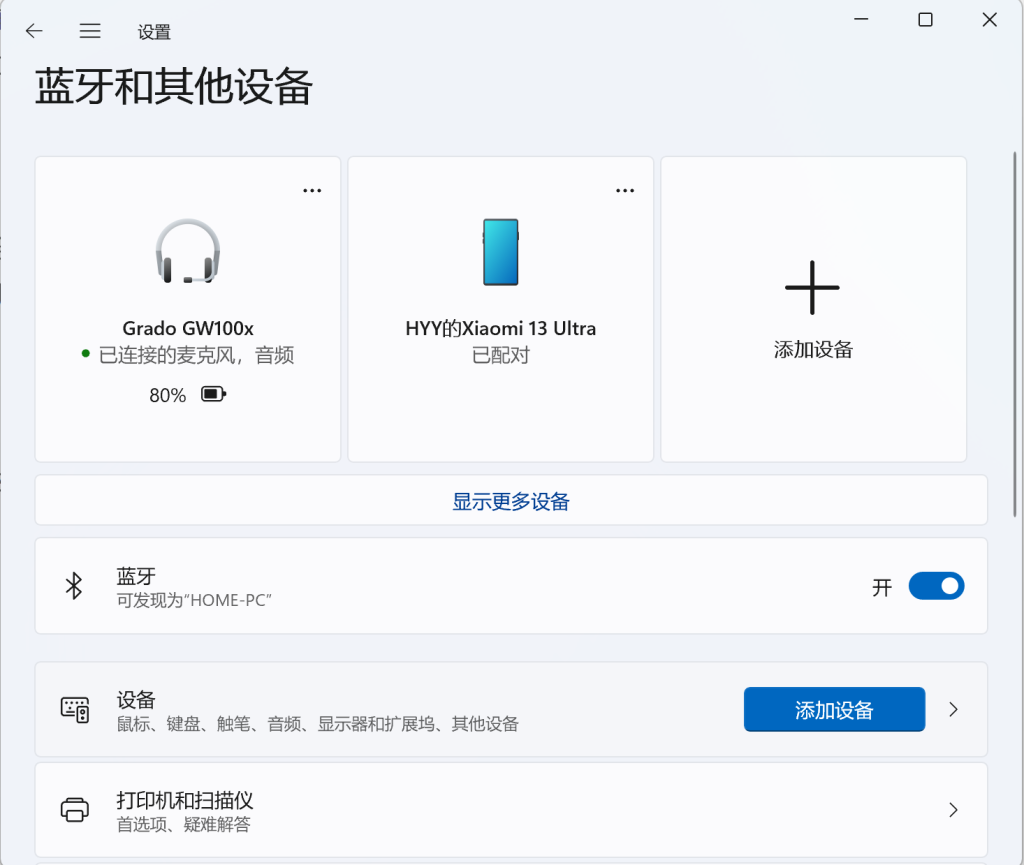
Pair and connect your Bluetooth headphones using the built-in Bluetooth feature in Windows. Once connected, you should see a screen similar to the one shown below in the system settings.
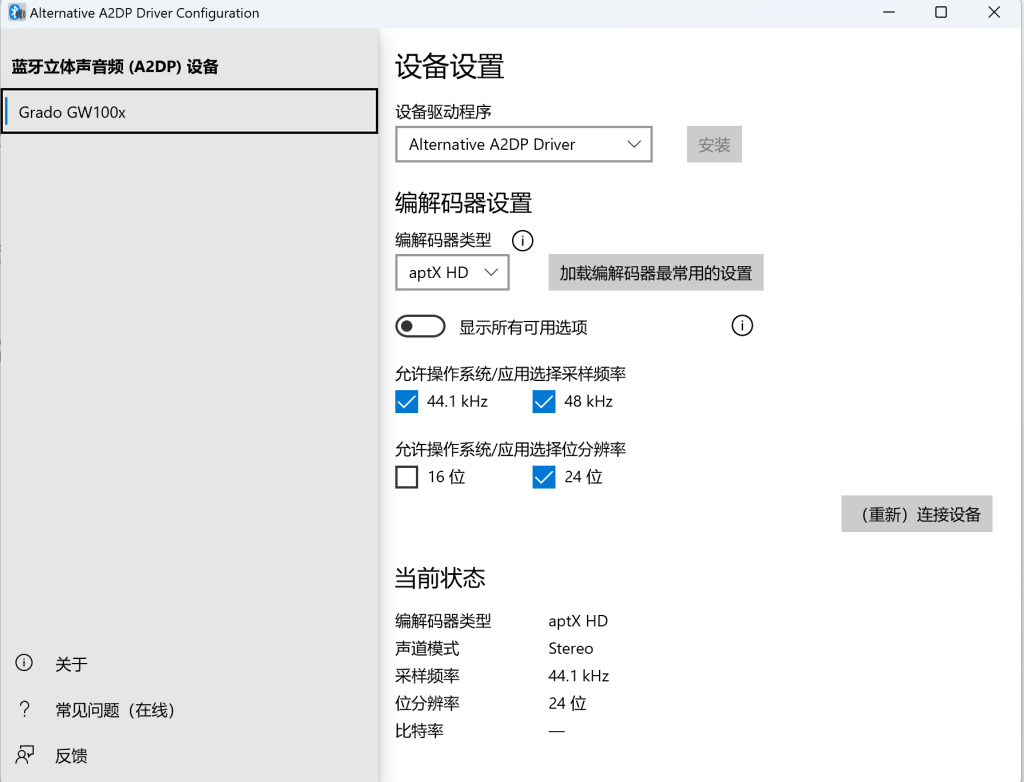
Next, launch the newly installed Alternative A2DP Driver software. Under the “Device Driver” section, select the “Alternative A2DP Driver” option as shown and click Install. Once finished, choose the corresponding “Codec Type” based on the highest codec specification supported by your headphones, then click “(Re)connect Device” as prompted to complete the setup for your Bluetooth headphones.
3. Payment and Activation
When the software is not yet activated, launching Alternative A2DP Driver will display a “Buy License” prompt at the top. Once you confirm everything works properly and consider it worth purchasing, click “Buy License” and choose to buy for this PC. Then, on the redirected web page, fill in your primary email address (crucial: make sure there are no typos), and complete the payment via Alipay to purchase the license.
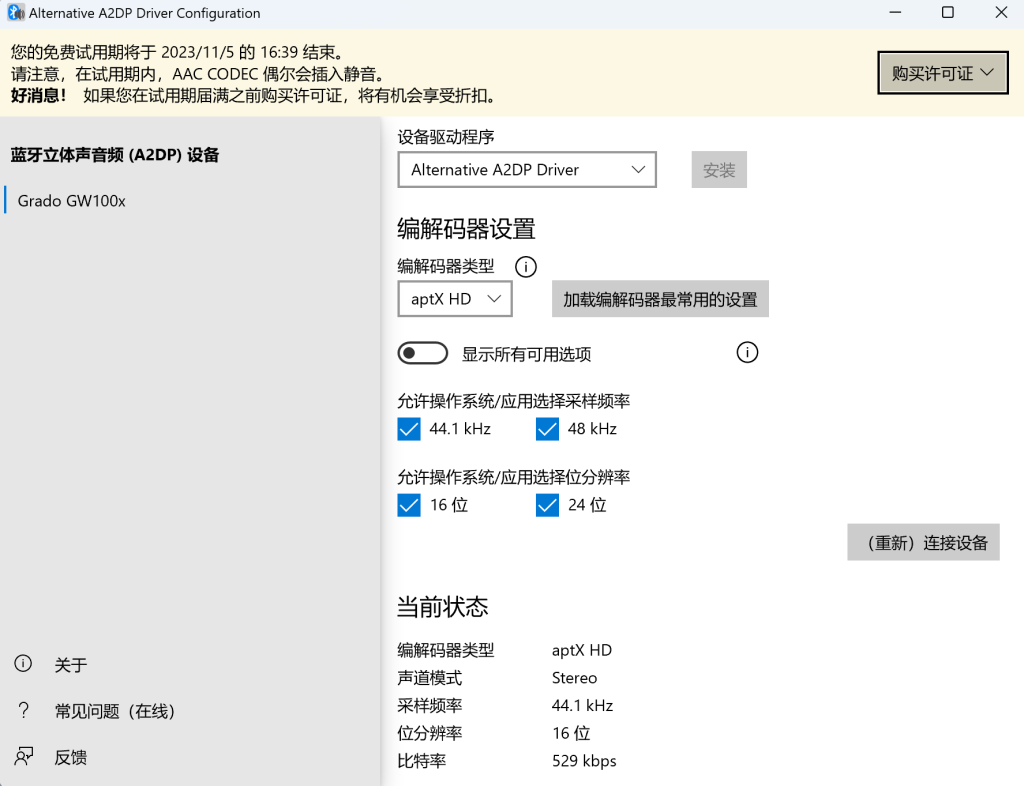
After completing the purchase, check your inbox; you will soon receive two emails. One is the payment receipt, and the other is the license certificate email titled “Alternative A2DP Driver License File“. Open this email, and you will find an attached license file named “AlternativeA2dpDriver.aalic” at the bottom, which you should download and save securely. Finally, return to the Alternative A2DP Driver interface, click the “Buy License” button again, select the second option “I already have a license”, and select the “AlternativeA2dpDriver.aalic” file you just downloaded to complete activation. Note that if you wish to purchase additional licenses later, you can repurchase at a discounted rate of $2 per computer (up to 3 additional PCs).
4. Regarding Sound Quality
The BLOG owner recalls mentioning this long ago: the sound quality difference between Bluetooth SBC and aptX HD/LDAC is quite substantial. While the BLOG owner has seen people suggest increasing SBC’s sample rate, the BLOG owner believes this makes little practical sense nowadays, as very few headphones support only SBC today. When better codecs are available, it is always best to make use of them.


You May Also Like

HIFI Diary: TANCHJIM 4U 4-Level Sound Adjustment In-Ear Sound Quality Review

Classical Diary: A Beacon on the Eve of Change — Johannes Ockeghem (Part 5)